

If you're wondering what tools I actually use to run my food blog, this is it. I've tested a lot over the years (some were a waste of money, honestly), and these are the blogging resources that truly made a difference - from getting my first traffic to turning my blog into real income.
These are simple, beginner-friendly tools that save time, grow your audience, and help you make money faster. If I had to start over today, this is exactly what I would use.
Disclosure: The following section contains affiliate links from Bluehost, Bigscoots, Flodesk and others. If you buy through my links, I may earn a small commission at no extra cost to you. Thank you!
Table of Contents
- 🖥️ 1. Website Hosting (Start Here)
- 🍽️ 2. Recipe Plugins (A Must for Food Bloggers)
- 👩💻 3. Essential Plugins
- 🛠️ 4. Theme & Tech Support
- 📧 5. Email Marketing (Grow Your List Early)
- 🔍 6. SEO + Keyword Research (This Is How You Get Traffic)
- 🧠 7. Analytics & Tracking
- 💰 8. Monetization + Affiliate Tools
- 🎓 9. Courses + Learning (If You Want Real Growth)
- 🛍️ 10. Passive Income + Digital Products
- 🤑 11. Affiliate Marketing
- ⚙️ Tools I Use Daily
- 🧠 My Exact Blogging Setup (If I Started Today)
- Blogging Tips: FAQ
- My Photography Equipment
- More Blogging Resources
- Pin It For Later!
- Join TYBInsider
- Comments
A note from the summer of 2026:
If you're reading this in the future, I want you to know that the online landscape is changing faster than ever. Google updates have become more frequent, AI Overviews are reshaping search results, and traditional SEO may not work the way it once did.
Use the strategies in this guide as a foundation, but don't follow them blindly. Do your own research, pay attention to emerging trends, and make decisions based on the reality of the current digital landscape. What works today may not work tomorrow.
Most importantly, stay flexible and be willing to pivot. The creators and business owners who thrive are not necessarily the ones with the perfect strategy, but the ones who adapt, experiment, and continue moving forward even when the rules change.
Keep learning, keep testing, and trust yourself to evolve with the times.
-Julia
Want to Save This Recipe?
Enter your email and we’ll send the recipe directly to you!
By submitting this form, you consent to receive emails from The Yummy Bowl.
🖥️ 1. Website Hosting (Start Here)
If you don't have hosting yet, start here - this is the foundation of your blog.
Bluehost (best for beginners)
If you're just starting your blog, Bluehost is the easiest and most affordable way to get online fast. I used them when I first started out, and I loved how simple everything was. Setup took just a few minutes, and they walk you through everything step by step.
It's perfect if you don't want to deal with anything technical and just want to get your blog live. Learn more how to start a blog for $1.99/month.
Learn how I first started with Bluehost here.
P.S. You'll hear a lot of people online saying you need "premium" hosting right away - I don't agree. I started with basic hosting, and it worked just fine. In my experience, it's much more important to focus on content and traffic first, and upgrade only when your blog actually needs it.
BigScoots (best for growing blogs)
Once your blog starts getting traffic, BigScoots is 100% worth switching to. I moved my site there after outgrowing shared hosting, and the speed difference was honestly huge. My site became faster, more stable, and I stopped worrying about crashes during high traffic days.
Their support is also amazing - which matters more than you think. Read my story how I started with Bigscoots.
🍽️ 2. Recipe Plugins (A Must for Food Bloggers)
If you're running a food blog, you need a recipe plugin. This is what helps you get those Google recipe cards (rich snippets) - which means more traffic.
WP Recipe Maker
This is what I personally recommend if you want beautiful, SEO-friendly recipe cards. It helps your recipes show up better in Google and makes your posts look more professional. This is what I've used for years.
WP Tasty
Another great option, especially if you're focused on site speed and monetization tools.
Both are solid - you really can't go wrong here. Just pick one and start.

Image by canvacreativestudios
👩💻 3. Essential Plugins
These are a few plugins that are a must-have for serious blogging growth.
- Link Whisper - Helps you add internal links to your posts quickly, which is great for SEO and improving site structure.
- Shortpixel - A super helpful plugin to compress and optimize your images so your site loads faster. It runs in the background and keeps your images lightweight without losing quality.
- PrettyLinks - A plugin that lets you create clean, branded affiliate links instead of long messy ones. It also helps you track clicks, which is really useful once you start monetizing.
- Antispam Bee - An easy, free way to stop comment spam without annoying captchas or privacy issues.
- WP Rocket - A caching plugin that makes your site load much faster without needing technical setup. I noticed a big speed improvement after using it.
- Code Snippets - Lets you add small bits of code to your site safely without editing theme files. Super useful for custom tweaks without breaking anything.
- WP All Export - Makes it easy to export your posts, recipes, or data into files. Helpful if you're working with a VA or organizing content.
- Replace Media - Allows you to replace images or files in your media library without changing the URL. Saves a lot of time when updating content.
- Hubbub Pro - A helpful plugin for managing and organizing content workflows, especially if you're working with a team or VAs.
- UpdraftPlus - A backup plugin that automatically saves your site. It's one of those things you hope you never need, but you'll be glad you have it.
🛠️ 4. Theme & Tech Support
- Kadence - A lightweight, flexible WordPress page builder and theme that's easy to customize and works great for food blogs. It's fast, clean, and beginner-friendly, but still powerful enough as your site grows. I am using Kadence page builder for my other websites, together with themes from Restored316.
- Feast Foodie Pro (by Feast Design Co.) - A theme made specifically for food bloggers. It's quite simple and quite limited in customization, but it's built with SEO, speed, and monetization in mind, which is what really matters. I also like their White Glow service if you want everything set up for you - although honestly, doing it yourself is much more affordable and easier than it might seem.
- Grayson Bell from iMark Interactive - My go-to for technical support. If something breaks or you need custom fixes, having someone reliable like this is honestly a lifesaver.
- NerdPress - Helps with maintenance, fixes, and keeping your site running smoothly. Great once you start earning and don't want to deal with site optimization.
📧 5. Email Marketing (Grow Your List Early)
Flodesk
Flodesk is my favorite email platform, especially for food bloggers. I switched to it after trying a few others, and it completely changed how I handle email. The templates are beautiful, automation is simple, and it's very beginner-friendly. If you've been putting off starting an email list, this makes it way easier. Other platform I recommend: Kit.
🔍 6. SEO + Keyword Research (This Is How You Get Traffic)
If you want traffic from Google (and Pinterest), keyword research is not optional.
KeySearch (best for beginners)
This is what I started with. It's affordable, simple, and perfect when you're learning SEO. Also check out Keywords Everywhere.
Semrush (best for scaling)
This is what I use now. It's a full SEO tool that helps with keyword research, competitor analysis, and content planning. Once your blog grows, this is a game-changer.
🧠 7. Analytics & Tracking
- Google Analytics - Helps you understand how people find and use your site. From basic setup to deeper insights, it's the main tool I use to track what's working.
- Google Search Console - Shows how your site performs in Google search and helps you track traffic, rankings, and any issues. It's essential for understanding what's bringing people to your blog.
💰 8. Monetization + Affiliate Tools
Tasty Links (Amazon affiliate plugin)
This plugin makes managing Amazon links so much easier. It automatically creates keyword-based links, pulls product images, and helps you stay compliant with Amazon rules - all in one dashboard.
If you're doing affiliate marketing, this saves a lot of time.
Amazon Associates
This is one of the easiest ways to start making money from your blog. You recommend products you already use (kitchen tools, ingredients, gadgets), and earn a small commission when someone buys through your link. Create your own Amazon storefront to list all of your fave products in one place.
💰 Affiliate Networks
You may not get accepted into these right away, and that's totally normal. Once your blog starts getting steady traffic, these are great to apply for and can open up more income opportunities beyond basic affiliate links.
- Skimlinks - Automatically turns product mentions into affiliate links, which is super convenient. Great for monetizing content without manually adding links everywhere.
- Awin - A large affiliate network with lots of well-known brands. Good once you're ready to work with more established partnerships.
- Impact - Another popular platform that connects you with bigger brands and higher-paying affiliate programs as your blog grows.
🎓 9. Courses + Learning (If You Want Real Growth)
- Food Blogger Pro - This is one resource I wish I joined sooner. Their courses and community helped me understand SEO, grow traffic, and treat my blog like an actual business - not just a hobby. I also love their podcast - I still listen to it for updates and ideas. If you're serious about turning your blog into income, this is a great place to start.
- AppSumo - A curated marketplace for apps, software tools, and online courses, including creator courses for bloggers and influencers. It's a great place to learn new skills and test tools without locking yourself into another monthly plan.
- Photography Courses - There are a lot! I recommend taking a few different ones so you can have more experience and find your own style.
- Youtube - I learned so much in the beginning just by watching videos on lighting, food styling, and composition. It's such an easy (and free) way to improve your photos. Start with TheBiteshot.
- EatBlogTalk Podcast - The best for anything blogging related!
- Niche Pursuits Podcast - Start with blogger interviews (any niche really, I listened to all of them!)
- Tophatrank Podcast - A helpful podcast for keeping up with blogging and SEO updates. I personally use it more for awareness and trends rather than following every tip exactly - once you have experience, you'll naturally find what works best for your own blog.

Image by ivan s
🛍️ 10. Passive Income + Digital Products
- Beautiful PLR Templates - If you've ever felt stuck creating products from scratch, this is a huge time saver. You get hundreds of ready-to-sell printables, and you can customize them for your audience. Think meal planners, grocery lists, kitchen printables - perfect for food bloggers. I love how quickly you can go from idea → product → income with this.
- Etsy - A great place to find affordable Pinterest templates, logos, and ebook templates. There are tons of ready-made designs you can customize quickly, which saves so much time (especially if you're not a designer).
- Creative Market - Tons of beautiful logos, and design elements from talented designers. You can also read reviews before buying, which is super helpful.
🤑 11. Affiliate Marketing
- Amazon Associates - One of the first affiliate programs I recommend joining. It's easy to get started, readers already trust Amazon, and you can earn commissions on millions of kitchen tools, pantry staples, cookbooks, and appliances you naturally mention in your recipes. It's a great foundation for any new food blog.
- Travelpayouts - If you love traveling and occasionally share destination guides, restaurant recommendations, or food adventures, Travelpayouts is worth joining. It gives you access to affiliates like hotels, flights, tours, travel insurance, and more-all from one dashboard. Even if travel isn't your main niche, it can be a nice additional income stream.
- Awin - Awin is one of my favorite affiliate networks because it gives you access to hundreds of well-known brands in food, home, kitchen, lifestyle, and travel. Once you're approved, you can apply to individual merchants and find products that fit naturally into your content.
- Impact - Impact partners with many premium brands and is where you'll find programs that aren't available on other affiliate networks. It's perfect for food bloggers looking to promote kitchen products, meal planning tools, grocery services, and other high-quality brands while managing everything from one account.
- Rakuten Advertising - Rakuten Advertising connects you with many established retailers and household brands. While approval can sometimes be more selective, it's a great network to have once your blog starts growing and you're looking to diversify your affiliate income.
- Club Target (Target Affiliate Program) - Target is a fantastic option if your audience is primarily in the United States. You can recommend everything from cookware and kitchen gadgets to pantry essentials, seasonal décor, and home products. Their brand recognition often helps improve conversion rates.
- Walmart Creator (Affiliate Program) - Walmart has become one of my favorite affiliate programs for everyday kitchen products, small appliances, groceries, and home essentials. Their competitive pricing makes it easy to recommend products your readers are already shopping for, and it's a great alternative to Amazon.
- Skimlinks - Automatically monetizes merchant links and gives access to thousands of retailers. Great as a backup for merchants you can't join directly.
Bonus Tip: Don't rely on just one affiliate program. Different brands convert better for different audiences, and having multiple affiliate partners gives you more flexibility, higher earning potential, and a backup if one program changes its commission rates.
⚙️ Tools I Use Daily
These are the tools I use almost every single day to run my blog.
- Trello - helps me to organize content, tasks for VA's, and workflows in one place. Great for staying on track.
- Canva - for blog graphics, Pinterest pins, and downloads.
- Tailwind & Pinterest - for scheduling pins and bringing in free traffic. Tailwind is the tool I use at the moment. It is a little pricey and not always the fastest, but it is an official Pinterest-approved scheduling app. That said, Pinterest's built-in scheduler is also a great option when you are just starting out.
- Google Analytics - to track traffic and see what's working.
- CoSchedule - for scheduling social media posts.
- FloDesk - sending out newsletters and promoting products to my readers.
- Adobe Lightroom & Photoshop - a must have if you're a photographer.
🧠 My Exact Blogging Setup (If I Started Today)
If I had to start from scratch, this is exactly what I would do:
- Start with Bluehost, get a theme
- Install WP Recipe Maker
- Use KeySearch to find keywords
- Start an email list with Flodesk right away. Create a freebie (digital product/guide)
- Listen to Podcasts to learn faster
- Join Facebook Groups/communities for bloggers
Simple, focused, and no overwhelm.
Blogging Tips: FAQ
You only need a few things: hosting, a WordPress site, a recipe plugin, and a basic keyword tool. Everything else can come later.
You can start for very little - mainly hosting and a domain. Most tools can be added later as your blog grows.
Yes. If you want your recipes to show up in Google properly and get more clicks, this is essential.
As early as possible. Even if you only have a few readers, your email list will become one of your biggest assets.
My Photography Equipment
Backdrops for shooting - Capture by Lucy. Seriously gorgeous!

Canon EOS 5D Mark IV DSLR Camera
Buy Now →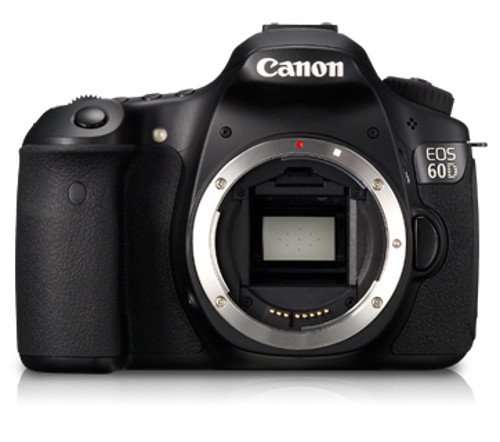
Canon EOS 60D Digital Camera Body
Buy Now →
Canon EF 24-70mm f/2.8L II Lens
Buy Now → Buy Now →
Canon RF24-105mm F2.8 L is USM Z Standard Zoom Lens
Buy Now → Buy Now →
  Buy Now →
  Buy Now →
  Buy Now →
Light Reflector Diffuser 5 in 1
Buy Now →
Join TYB
Insider
Get access to exclusive recipes,
weekly meal plans, printable
grocery lists, and AD-FREE
browsing designed to make
mealtime easier.
Comments
No Comments